400 × 200 mm face module
The metric presets use a 390 × 190 mm actual face with a 10 mm joint allowance. Choose a 100 or 200 mm thickness module. Coverage is 12.5 block equivalents per m². A 10 m² wall with 5% allowance needs 132 blocks.
Calculate concrete, cinder and CMU blocks. Adjust openings, block sizes and waste.
Area calculation: 180 block equivalents before rounding.
Check cuts, special units and supplier quantities before ordering.
Nominal dimensions include joints. Actual dimensions need a joint allowance.
See the workingThe calculation
For a standard 16 × 8 inch nominal block module, multiply net wall area in square feet by 1.125. Apply your chosen waste allowance, then round the final quantity up to whole blocks. Deduct doors and windows before calculating the net area.
Multiply wall length by wall height. Add the areas of separate wall sections when you are estimating a room, garage or building.
Deduct doors, windows and other gaps from their assigned walls. Measure each opening once and keep entries from overlapping.
Divide the net area by the block module area. Apply waste for cuts and breakage, then round the final order up to whole units.
Formula: round up [net wall area ÷ module face area × (1 + allowance ÷ 100)]. Use full precision until the final rounding.
Choose Net wall area in the calculator and enter square feet or square metres. This concrete block area calculator expects an area with openings already removed. It does not deduct them a second time.
The block face is its length and height as viewed in the wall. Face area is different from block volume. For the standard 16 × 8 inch module, one unit covers 8/9 of a square foot, so the block calculation is net square feet × 1.125 before waste.
If your takeoff lists face feet, confirm that it means square feet of wall face before entering it here. Linear feet alone do not give a wall area. You also need the wall height.
A 100 ft² wall uses 112.5 block equivalents with a 16 × 8 inch module. That is 113 whole base units. With 5% allowance, the final order is round up (112.5 × 1.05) = 119 blocks, which is 113 base units plus 6 extra units.
The calculator applies allowance to the unrounded equivalents. It rounds the order once at the end, so a fractional base quantity does not receive an extra round of allowance.
Measurements
Three dimensions describe a block, but only two make up its face in a standard upright wall.
A nominal 8 × 8 × 16 inch concrete masonry unit commonly has specified actual dimensions of 7⅝ × 7⅝ × 15⅝ inches. A ⅜ inch joint makes the familiar module. See the modular layout source.
In Nominal module mode, that joint is already included. In Actual plus joint mode, the calculator adds your joint to the actual face dimensions. It never adds a joint twice.
An 8 foot wall spans 12 nominal 8 inch courses. The result includes a course equivalent for each wall. A final laying plan also needs the actual bed joints, end conditions, bond pattern, cuts and corner units.
Enter a course count and the nominal height of each course.
Use the nominal course height, including its joint allowance. This separate check excludes caps and special end conditions.
Choose On flat in the options to use the block thickness as its face height. A 6 inch unit on flat has a different coverage from the same unit upright. Orientation here is a quantity input, not a construction recommendation.
Block sizes
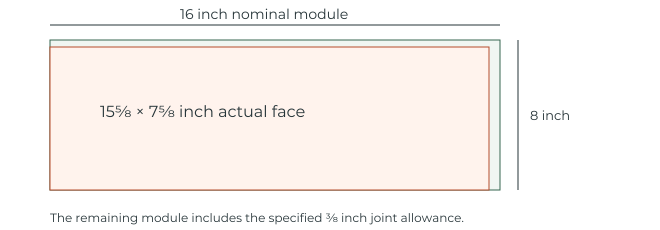
For upright 16 × 8 inch modules, changing thickness changes the wall specification, fill and weight. It does not change the face coverage.
| Nominal size, in | Common actual size, in | Blocks / 100 ft² | Equivalents / m² |
|---|---|---|---|
| 4 × 8 × 16 | 3⅝ × 7⅝ × 15⅝ | 113 | 12.11 |
| 6 × 8 × 16 | 5⅝ × 7⅝ × 15⅝ | 113 | 12.11 |
| 8 × 8 × 16 Common choice | 7⅝ × 7⅝ × 15⅝ | 113 | 12.11 |
| 10 × 8 × 16 | 9⅝ × 7⅝ × 15⅝ | 113 | 12.11 |
| 12 × 8 × 16 | 11⅝ × 7⅝ × 15⅝ | 113 | 12.11 |
| 8 × 8 × 8 half unit | 7⅝ × 7⅝ × 7⅝ | 225 | 24.22 |
The 100 ft² column rounds up after dividing area by the nominal module. No waste is included. The metric column shows unrounded unit equivalents to two decimals, not an order quantity. Verify the actual product dimensions.
For metric estimates, blocks per m² = 1 ÷ [(module length in mm ÷ 1,000) × (module height in mm ÷ 1,000)]. A US 16 × 8 inch module gives about 12.1094 equivalents per m². A 400 × 200 mm module gives 12.5. These rates exclude waste.
Switching units converts your measurements. It keeps a US 16 × 8 inch module at exactly 406.4 × 203.2 mm. To use a different product, select a metric preset or enter Custom size. Presets are shown as thickness × height × length.
The metric presets use a 390 × 190 mm actual face with a 10 mm joint allowance. Choose a 100 or 200 mm thickness module. Coverage is 12.5 block equivalents per m². A 10 m² wall with 5% allowance needs 132 blocks.
This custom example uses a 100 mm thick unit and a specified 10 mm joint. Its estimating face module is 450 × 225 mm. A 10 m² wall with 5% allowance needs 104 blocks.
Actual product dimensions are illustrated by Adbri Masonry and Forterra. The 10 mm joints are estimating assumptions for these examples. Use the dimensions and joint specified for your project.
For projects in the UK, Ireland, Australia, India or South Africa, check the local product rather than selecting by country name. Custom inputs support other sizes, but these examples do not establish a national building specification. Hollow and solid units with the same face module have the same area based count; fill and weight quantities differ.
Project examples
These examples use 16 × 8 inch nominal face modules and a 5% block allowance. Load one to inspect every input.
20 × 8 ft wall, minus one 3 × 7 ft door. Net area: 139 ft².
Four 10 ft wall runs, each 8 ft high. No openings. Area: 320 ft².
Four 20 × 8 ft wall runs, minus a 16 × 7 ft garage opening and a 3 × 7 ft door.
One 50 × 6 ft run, with no openings. Net area: 300 ft².
Two 12 ft and two 16 ft wall runs, 8 ft high, minus one 3 × 7 ft door.
Wall runs of 30, 20, 30 and 20 ft, each 4 ft high. Deduct two 3 × 2 ft windows. Net area: 388 ft².
Wall runs of 30, 40, 30 and 40 ft, each 8 ft high. Deduct six 3 × 4 ft windows and two 3 × 7 ft doors. Net area: 1,006 ft².
Wall runs of 30, 20, 30 and 20 ft, each 8 ft high. Deduct four 3 × 2 ft windows and one 3 × 7 ft door. Net area: 755 ft².
To estimate a concrete block foundation or basement wall, enter its specified runs and heights, then deduct windows or access openings. The quantity calculation does not determine footing size, soil support, reinforcement or waterproofing.
Use the multiple wall option for a concrete block house or building estimate. Floor area alone cannot tell you how many blocks you need. Include every specified wall, its height and its openings. Measure each wall run consistently so corner areas are counted once. These examples use specified, nonoverlapping wall runs rather than outside footprint dimensions. Add interior walls separately; they are not inferred from floor area.
Room and building examples are wall area takeoffs using the stated run lengths. Foundation height and construction details must already be specified. Corners, piers, lintels, specialty units and cut reuse still need a layout check.
Material planning
Set a waste allowance, add supplier details and keep block, mortar and fill quantities separate.
The starting allowance is 5%, and you can change it to match your cuts, handling and supplier advice. Zero is valid. A short straight wall and a complex corner layout may need different allowances.
Open Mortar and purchasing to add a documented bag coverage. The product example uses an 80 lb bag of QUIKRETE Mortar Mix covering up to 13 standard 8 × 8 × 16 inch units. Mortar is based on installed block equivalents and its own allowance. This is a named product coverage example, not a mortar type selection. Check the product data.
Enter your local price per block for a block material subtotal. Add the supplier count per pallet to split the order into full pallets and loose blocks. Counts vary by product. Labor, tax, delivery, mortar and grout costs are excluded from this subtotal.
A block and mortar estimate covers the joints. Concrete or grout for hollow cores needs a separate specified fill schedule and product yield. This calculator does not infer filled cells or a reinforcement design.
Need separate cement and sand quantities? A bagged mortar estimate uses a premixed product. This tool does not calculate the loose cement and sand needed for a site mixed mortar. Those quantities require your specified mix and a matching yield.
Free Excel download
Use the concrete block calculator in Excel for up to 8 wall sections and 10 opening entries, block dimensions, waste and an optional block price. Clear input tables, a prominent order summary and visible formulas keep the estimate easy to check. The workbook separates block equivalents, whole base units and extra units.
Common questions
Yes. This free block wall calculator estimates concrete masonry units by face area. People often call these units cinder blocks or cement blocks. Those names do not identify a precise product specification. Select the dimensions of the unit you will actually buy. A masonry calculator cannot choose its structural grade for you.
A nominal 16 × 8 inch face covers 0.8889 ft², so you need 1.125 block equivalents per square foot. A 100 ft² wall is 112.5 equivalents, rounded to 113 units before any allowance. With 5% allowance, the same 100 ft² requires 119 units, including 6 units above the rounded base. The final purchasing number also depends on openings, waste and layout.
For four 10 foot wall runs at 8 feet high, the total wall area is 320 ft². Standard 16 × 8 inch modules give 360 block equivalents, or 378 units with a 5% allowance and no openings. This assumes the stated wall runs. Doors, windows, corners and the actual room measurement convention change the takeoff.
Not when both are upright with the same 16 × 8 inch nominal face. Thickness affects material volume, weight and specification. If the units are laid on flat, thickness becomes part of the visible face and the count changes.
Split it into nonoverlapping shapes and calculate their combined net area, then use Net wall area mode. For a triangular section, area is base × height ÷ 2. Allow separately for the extra cuts. The wall sketch represents the supplied area and is not a construction layout.
Yes. The mobile web calculator works without an account. Use your browser menu to add it to your home screen where supported. On supported browsers, the hosted calculator can cache its core files for offline use after an initial online visit. Keeping that offline copy depends on the browser retaining its site data. Share copies a link containing your inputs; Print opens your browser print options.
Use documented supplier coverage that matches the selected block, bedding and joint conditions. The standard product example is not a universal bags per 100 blocks rule. Choose Custom coverage when your setup differs. A bag of premixed mortar is not equivalent to a bag of masonry cement that still needs sand.
The optional cost is purchased block units multiplied by your entered unit price. It is a block material subtotal. A full quote needs the other specified materials, labor, equipment, delivery, tax and project conditions. The quantity tool does not design retaining walls, foundations, columns or reinforcement.
Publisher & checks
BlockCalculatorPro publishes this free concrete masonry quantity estimator. It is built for people checking a material takeoff from measured wall runs or a known net area. The formulas, assumptions and worked examples are available on this page so the result can be checked.
The estimating and modular dimension explanations reference CMHA guidance. Named product examples link to manufacturer data. Product dimensions and mortar yields apply to the stated example; your specified product takes priority.
Automated checks compare the calculation with independently worked US and metric cases. They cover opening deductions, nominal and actual dimensions, waste, rounding and invalid inputs. The loadable examples show the same method with every input available to inspect.
The calculation method and product references appear with the sources below. Revisions are checked against the same reference cases. The result estimates material quantities; construction layout, structural sizes and product suitability follow the project specification.
Method & sources
BlockCalculatorPro uses an area based quantity method, explicit unit conversions and rounding after allowance. Product examples are identified rather than treated as universal yields.
Checks cover opening deductions, US and metric conversions, nominal and actual dimensions, final rounding and invalid inputs. A quantity estimate does not establish a construction layout or structural specification.
Calculation method 1.1.0. Product references and assumptions are identified below.
Choose the next step in your material takeoff. Connected calculator links carry the relevant quantities and keep product assumptions visible.
Estimate the grout inside hollow blocks, with separate fill scope, allowance and bag yield.
Mortar calculator for blockCalculate laying mortar from product coverage or your specified cement and sand recipe.
Concrete block weight calculatorEstimate empty or filled block mass using supplier weights or a known net material volume.
Blocks per pallet calculatorTurn your quantity into full pallets and loose blocks using the packaging for your supplier.
Count straight or curved wall units, caps and specified aggregate volumes with the assumptions visible.
Cinder block garden bed calculatorCount a rectangular bed course by course, with alternating butt corners and a separate soil volume.
Retaining wall blocksA practical guide to wall systems, block coverage, caps and measurements before estimating materials.
Count a specified post or column pattern without treating every block shape as interchangeable.
Block wall footing calculatorCalculate concrete from the footing dimensions already specified for your project.
Concrete block steps calculatorCount body and finish products from a supplied tier schedule, or estimate a fully filled rectangular tier model.
Concrete blocks and CMUUnderstand the unit, identify its job and use the right measurements for a material takeoff.