Explore one straight wall in stack bond or running bond. Place openings by their position and dimensions, then inspect the course diagram and occupied cell counts. Check the actual cuts and product schedule separately before ordering.
Maintained by BlockCalculatorPro. Check our reference cases.
How this calculator works
Divide the wall into laid module cells. Offset alternate courses by half a module for running bond. Remove fully empty opening cells and identify clipped cells. This model allows one stock unit per occupied cell before the entered allowance and assumes no cut reuse.
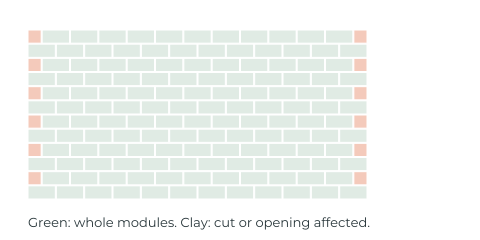
This is a modular illustration, not a fabrication cut list or structural bond approval. One occupied cell is allowed one stock unit; fragments are not reused between cells. Lintels, corner units and reinforcement remain separate.
Set the laid module before placing the wall
The horizontal module combines the actual unit length and the specified head joint. The vertical module combines the actual unit height and the specified bed joint. A typical US unit 15⅝ in long and 7⅝ in high with ⅜ in joints forms a 16 by 8 inch nominal face module.
Use zero joints only when that matches the specified layout. Factory metric units can use a different module from converted US products. Keep the unit dimensions and joint dimensions from the same supplier detail.
The diagram represents the entered course module. At exposed wall ends and the top, confirm whether the project dimensions include a finishing joint, cap or other terminal detail. A module grid is useful for planning, but the final physical face dimensions still depend on those end conditions.
Compare stack bond and running bond
Stack bond keeps the course grid aligned vertically. The running bond option offsets alternate courses by half the laid module. That offset can create shorter starter or end pieces even when the overall wall length divides evenly into full modules.
Choose the pattern already specified for your wall. Bond affects more than appearance. CMHA notes that modular coordination and unit cell alignment matter for reinforcement and grout placement, and that different bonds can have different design assumptions.
This straight wall layout does not detail corners, wall returns, control joints, bond beams or specialty jamb units. Include those from the project schedule rather than assuming every drawn rectangle represents an interchangeable standard block.
Place openings by position, width and height
For each opening, enter the horizontal distance from the wall's left reference edge and the vertical distance from its bottom reference edge, followed by the opening width and height. Use the masonry opening shown in the plan, which can differ from the finished door or window size.
The tool removes the overlapping part of each course cell. An opening aligned to the module can leave a simpler pattern; the same opening moved sideways can create additional cut edges without changing the net wall area.
At an 8 inch course module, a 96 inch wall occupies 12 nominal courses. A 32 by 48 inch opening has the area of 12 standard 16 by 8 inch modules. Moving that opening does not change its area, but it can change which pieces are full, cut or split around it.
Lintels, bearing lengths, sills, jamb reinforcement and opening support are not created by clipping a diagram. Add those from the specified detail.
Read cells, cuts and stock as different quantities
A whole cell occupies a complete laid module in the diagram. An affected cell is clipped by a wall boundary or intersects an opening. One affected cell can contain more than one disconnected geometric fragment, so its cell count is not an individual cut piece count.
The diagram marks the cells that need closer review. It does not provide individual cutting dimensions or a fabrication list. Confirm minimum practical cuts, saw kerf, face appearance and unit core geometry with the supplier or installer.
The model allows one stock unit per occupied cell before the entered allowance. It does not optimize offcuts between cells or prove that every retained fragment can be made from one actual hollow block. Review the fragments against your supplied detail and revise the product order where needed. Order factory half units and specialty units separately when the arrangement calls for them.
Why the layout differs from the homepage block count
An area estimate divides net wall area by the laid face area of one unit. It answers how many unit equivalents the face contains. This layout model instead counts occupied course cells after the bond and openings are applied.
Two half cells equal one full module by area, but the model allows one stock unit for each occupied cell without sharing offcuts between them. Moving an opening can change which cells are affected even when the wall and opening areas remain identical. Actual fabrication can need a different product schedule.
Compare the area equivalent, whole module cells, affected cells and modeled stock allowance as separate results. Use the homepage concrete block calculator for a quick quantity estimate and this tool to review course placement before checking the actual cuts.
Turn the diagram into a checked material schedule
- Confirm the wall reference dimensions and the actual product module.
- Check both the first and second course, especially at each end.
- Verify masonry opening positions against the plan.
- Review the smallest cuts and all disconnected pieces.
- Add the specified corner, jamb, lintel, bond beam and cap products.
- Choose a separate allowance for breakage and spare stock.
The drawing is a course planning aid for one straight wall. It is not a reinforcement plan or a structural construction drawing. The size guide and calculation methods explain the dimensional assumptions behind the results.
Common questions
Can this concrete block layout calculator show running bond?
Yes. Its running bond option shifts alternate courses by half the laid module so you can inspect course offsets, end cells and opening affected cells. Use the bond already specified for the project.
Should opening dimensions include the door frame?
Enter the masonry opening dimensions from the plan. Finished door and window sizes can be smaller than their masonry openings, so confirm the reference before subtracting them.
Why does moving an opening change the affected cell count?
The opening intersects different course cells after it moves. Its area stays the same, but the number of occupied or affected cells can change. Inspect the diagram and check the actual retained fragments separately.
Does the layout produce a cutting list or optimize offcuts?
No. It counts occupied cells and marks cells affected by openings or boundaries. The model allows one stock unit per occupied cell before allowance, without optimizing offcuts between cells. It does not list individual cutting dimensions or confirm that one actual block can supply every fragment within a cell.
Does the wall layout determine lintels or reinforcement?
No. Openings are removed geometrically. Lintels, bearings, reinforcement, grout, corners and control joints must come from the project details.
Sources and product references
Named product references support the examples. Confirm the currently supplied dimensions, yields and purchasing conditions before ordering.
- CMHA modular layout of concrete masonryPrimary reference for modular dimensions, opening coordination, cuts and bond considerations.
- CMHA considerations for specialty concrete masonry unitsSpecialty unit availability and coordination affect the final product schedule.
- QUIKRETE block wall unit and joint examplePrimary example of typical actual US unit dimensions and the nominal laid module.